Docker Architecture explained
Let's see how Docker works under the shell. But before we dive deep into that, let's learn about Docker daemon.
So Docker daemon(dockerd) runs on the host OS. It is responsible for managing docker services. It offers various Docker objects such as images, containers, network.
Docker uses Client-Server architecture and has three main components
Docker Client
Docker Host
Docker Registry
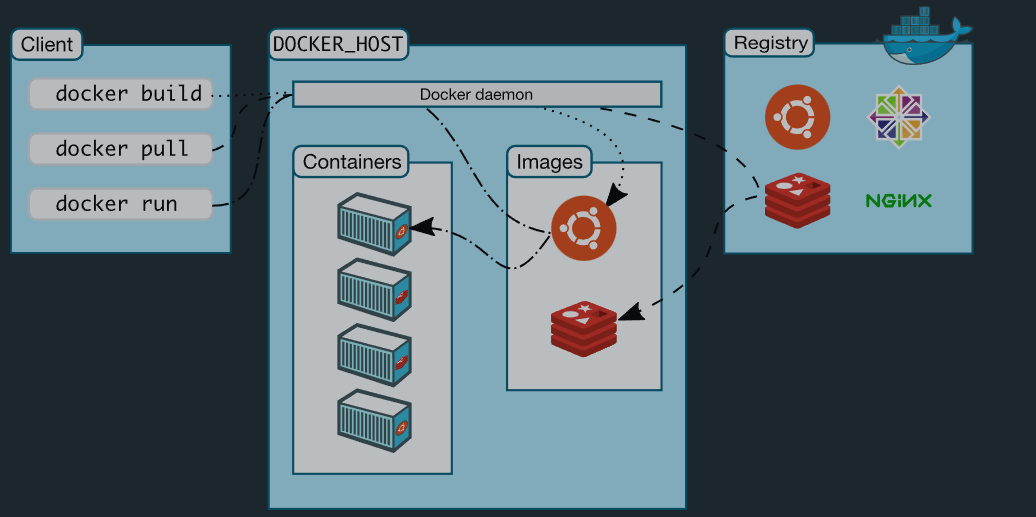
Docker Client
Docker Client uses commands and REST-API to send requests to daemon(dockerd). So, when you run a command on your terminal, Docker client sends a request to Docker Daemon on Docker Host and daemon receives it. Docker client can send command to one or more daemons
Docker Client uses Command Line Interface (CLI) to run the following commands -
docker build
docker pull
docker run
Docker Host
Docker Host is responsible for running and executing applications. It contains images, containers and networks etc.
Docker Registries:
Docker registries saves images for applications.
There are two types:
Public Registry:The images are available publicly
Private Registry:The images are available private for an enterprise
Docker Objects:
Images:Images, in simple terms are read-only binary templates blueprints or instructions to run applications. These contain details about the applications, the commands to run applications and the dependencies it needs to run. Often the image is built on top of another image with some amount of customization. This is called layering. Docker images are stacked one upon another. Layers are there, to save on computational effort when building images, and bandwidth when distributing (aka pulling and pushing) them. They use a copy-on-write filesystem to save on disk space for images and future containers.
You can download an image using Docker CLI with the docker pull <image_name> command
Example

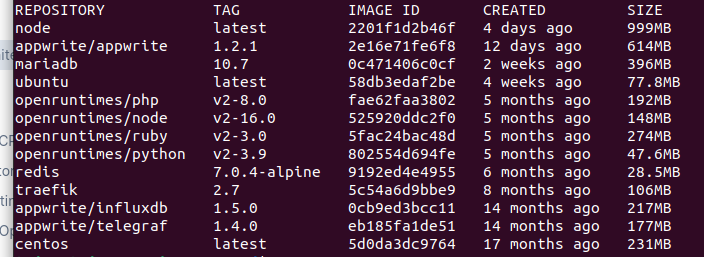
We can also see the number of images on our system by using the docker image ls command:

Containers: A docker container is an isolated environment with dependencies installed needed to run an application. The application running inside a container is isolated from the infrastructure which makes it easier to scale or ship. A container can be managed by using Docker CLI or its Desktop/Mac application. We can start it, stop it or completely wipe it off the face of the earth with commands. Each container has its isolated environment and we can use them to communicate with each other with the help of Docker Networking.
We can run containers using the docker run <container _name> command:
If the image is not available locally, docker automatically searches it up from Docker hub and then runs the container
Docker Networking
Using Docker Networking, an isolated package can be communicated. Docker contains the following network drivers -
Bridge - Bridge is a default network driver for the container. It is used when multiple docker communicates with the same docker host.
Host - It is used when we don't need for network isolation between the container and the host.
None - It disables all the networking.
Overlay - Overlay offers Swarm services to communicate with each other. It enables containers to run on the different docker host.
Macvlan - Macvlan is used when we want to assign MAC addresses to the containers.


